Playbooks
Playbooks automate common workflows and processes by defining reusable templates of actions that can be triggered on-demand by users, when specific events happen or through webhooks.

Some key benefits include:
- Accelerated GitOps Adoption - Use "ClickOps" to make changes to resources but have them being applied as Git pull requests in the background, enabling non-technical teams to leverage GitOps workflows.
- Consistency - Provide easy to discover and reusable templates for common tasks, preventing the complexity of doing the same thing multiple ways.
- Self-Service - Enable developers/operators to provision and manage their own resources without involving a central DevOps/Platform team.
- Compliance - Improve compliance and security by limiting the need for elevated privileges.
- Cost Efficiency - Optimize costs with on-demand environments that spin down after a fixed duration.
- Portability - A consistent interface for performing operations irrespective of the underlying infrastructure and/or environment
Use cases
Provisioning
Day 2 Operations
Day 2 operations can be added onto existing resources (configs, components or health checks) using resource selectors.
For example scaling a Kubernetes Deployment is only applicable to config items of type: Kubernetes::Deployment
scale-deployment.yamlapiVersion: mission-control.flanksource.com/v1
kind: Playbook
metadata:
  name: scale-deployment
spec:
  description: Scale Deployment
  configs:
    - types:
        - Kubernetes::Deployment
  parameters:
    - name: replicas
      label: The new desired number of replicas.
  actions:
    - name: kubectl scale
      exec:
        script: |
          kubectl scale --replicas={{.params.replicas}} \
            --namespace={{.config.tags.namespace}} \
            deployment {{.config.name}}
Before running a playbook, users can provide input using parameters.
In the playbook above, the user can decide the new number of replicas before running the playbook.
Just In Time Access
AIOps
Actions
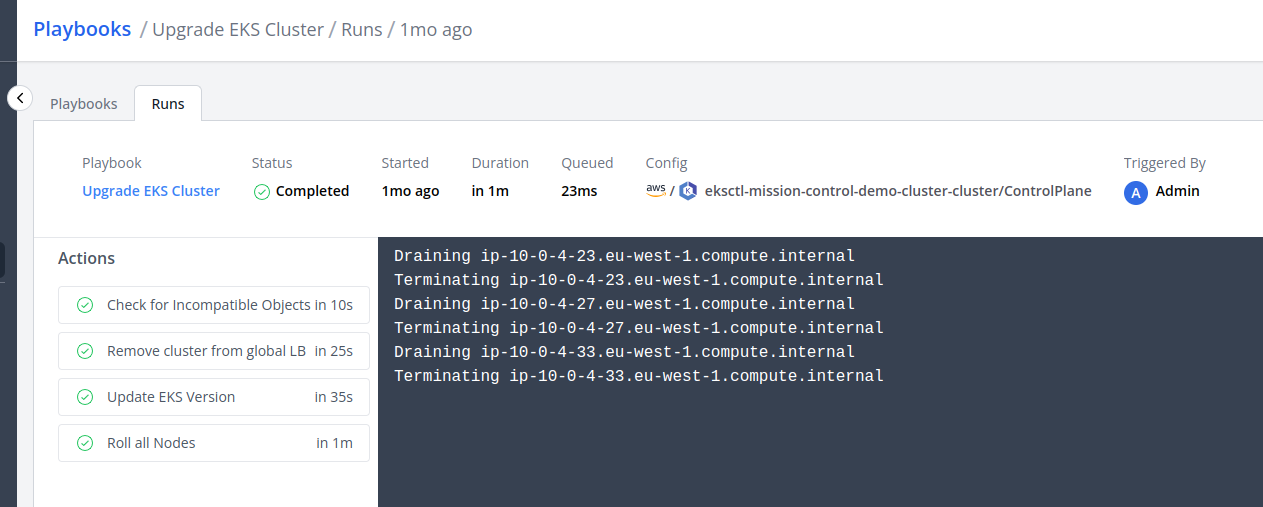
Playbooks execute a sequence of actions (steps), these actions can update git repositories, invoke pipelines or run command line tools like kubectl and aws.
Templating
The actions values can be templated using Go Templates
restart-deployment.yaml#...
kind: Playbook
spec:
  configs:
    - types:
        - Kubernetes::Deployment
  actions:
    - name: 'Restart kubernetes deployment'
      exec:
        script: kubectl rollout restart deployment {{.config.name}} -n {{.config.tags.namespace}}
The parameters to the playbooks are available in the Context
Approval
Playbooks can require approval before execution by configuring an approval block:
approve-kubernetes-scaling.yaml#...
kind: Playbook
spec:
  #...
  approval:
    type: any
    approvers:
      people:
        - admin@local
      teams:
        - DevOps
| Field | Description | Scheme | Required |
|---|---|---|---|
type | How many approvals required. Defaults to all | any or all | false |
approvers.[]people | Login or id of a person | People | false |
approvers.[]teams | Name or id of a team | Team | false |
Permissions
Roles control who may run, approve and cancel playbooks. This manifest lets john@doe.com run, approve and cancel any playbook on configs tagged cluster=aws or cluster=demo:
john-playbook-run.yamlapiVersion: mission-control.flanksource.com/v1
kind: Scope
metadata:
  name: all-playbooks
  namespace: default
spec:
  targets:
    - playbook:
        name: "*"
---
apiVersion: mission-control.flanksource.com/v1
kind: Scope
metadata:
  name: aws-and-demo-configs
  namespace: default
spec:
  targets:
    - config:
        tagSelector: cluster=aws
    - config:
        tagSelector: cluster=demo
---
apiVersion: mission-control.flanksource.com/v1
kind: Role
metadata:
  name: john-playbook-run
  namespace: default
spec:
  description: allow user john to run any playbook on configs with tags cluster = demo or aws
  rules:
    - name: run
      action: playbook:run
      resource:
        scopeRef: all-playbooks
      target:
        scopeRef: aws-and-demo-configs
    - name: approve
      action: playbook:approve
      resource:
        scopeRef: all-playbooks
      target:
        scopeRef: aws-and-demo-configs
    - name: cancel
      action: playbook:cancel
      resource:
        scopeRef: all-playbooks
      target:
        scopeRef: aws-and-demo-configs
---
apiVersion: mission-control.flanksource.com/v1
kind: RoleBinding
metadata:
  name: john-playbook-run
  namespace: default
spec:
  role: john-playbook-run
  subjects:
    people:
      - john@doe.com
Required permissions
To run a playbook on a resource, a subject needs:
playbook:runon the playbook, with the resource in the rule'stargetScopereadon the resource
A rule without a target only covers runs with no resource. Approving or cancelling a run needs playbook:approve or playbook:cancel, and read on the run's resource.
| Action | Description |
|---|---|
playbook:run | Run a playbook |
playbook:approve | Approve a playbook run |
playbook:cancel | Cancel a running playbook |
mcp:run | Run a playbook through MCP |
Who a run acts as
A run's actions are checked as its playbook, not as the person who started it. A playbook that no RoleBinding selects can't read a config, use a connection or run another playbook. When a playbook triggers another playbook, the first playbook needs playbook:run on the second and read on its target.
Whoever may run a playbook may have it act with the playbook's grants, through the parameters they pass too.